Wednesday, 17 September 2014

Classwork and Home Learning - Representations of gender in the media

1. WIDER READING / WATCHING


Some resources to get you thinking about gender representation.
Spend some time watching and listening to extra resources outside of lessons to improve your overall understanding - and grade!


https://www.pinterest.com/source/ad-busting.tumblr.com/

http://www.scoop.it/t/women-representation-in-the-media


VISIT and have a look here:
http://mediasmarts.ca/gender-representation/women-and-girls/media-portrayals-girls-and-women-introduction

Aiming for an A? Have a look at these slides to further your knowledge.

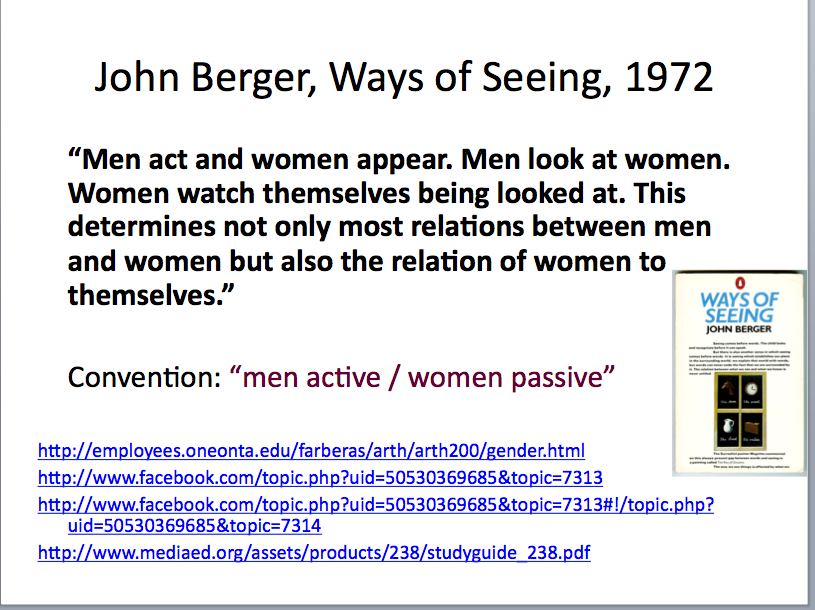


FINALLY, WATCH THIS AND TAKE NOTES for your portfolio research (sum up what key messages you can learn from the video)


2. Starting research for your coursework portfolio.

WHAT ABOUT REPRESENTATIONS OF WOMEN IN MUSIC VIDEOS?

What stereotypes are reinforced here? What are the messages in the song? Do you think Pink is being fair and making a good point or just reinforcing stereotypes?


Write your responses on A4 for the research section of your portfolio (We will finish this next lesson)

3. HOME LEARNING:

1. Watch Jessie J's video "Like a dude" then answer the following questions:
- What is Jessie J's message in this video? Do you think it is effective? Why? Why not?

Aim for one side of A4 and add some screen grabs from the video to justify your points.

WARNING: SOME SWEARING IN THE LYRICS.


2. Respond to the feedback/ questions I wrote as I marked your work. You may need to redraft one question.

3. Put some order in your folder. I WILL CHECK THEM AND EXPECT THEM TO BE CLEARLY ORGANISED.
Phone calls home if that's not the case.

Tuesday, 29 April 2014

B322 - Exam Practice (home-learning) - Enemy of the State extract

Use the clip below to answer the question I set for home learning (the extract is shorter to allow you to focus on the quality of your examples)

Start from 1: 03 till the end.

Before you start the exam question, you might want to think about the questions below first.

Enemy of the State, Tony Scott, 1998


Some questions to make you think first:
1. What is the point of this sequence? Describe briefly how tension is created through the editing.
2. Look at the use of CU or Medium CU. Why are they primarily used here? Refer to specific shots (screengrab them) and embed them within your post.
3. Choose 15-20 seconds from anywhere in the sequence and describe each shot in detail, explaining its effect / function for the audience, as well as commenting on how the cuts (the editing) add to the meaning.
4. How far does the editing of this sequence fit in with the action adventure genre? Justify your opinion.

Above all, do your best to engage with the sequence and the task.

Sunday, 29 September 2013

Shot Composition and other tricks

Composition - Take pictures and upload them. Demonstrate nose room, head room, lead room, eye line, rule of thirds as well as camera angles and distances
Watch the following clip to consolidate understanding. Other rules of composition are mentioned - can you spot them?


And to make sure you have a reference point for your understanding of camerawork, have a look at this amazing video:
 

LEARNING FROM ROBERT RODRIGUEZ (director)
You can learn an awful lot about making a film on a tight budget from Robert Rodriguez, director of El Mariachi. You can also find more of his videos on YouTube as well as extracts from his films.


And here is the trailer for El Mariachi (1992).


Back to Basics: CAMERAWORK
Easy to follow guide to learn the basics of the trade! Click here.

Continuity Editing

Continuity Editing (from this useful website)

      goal is to create a smooth flow from shot to shot

      invisible” = does not call attention to itself or remind viewer they are watching a movie

      Assumption: viewers are constructing a “mental map” (cognitive map) based on the info they see and hear.

   both onscreen and offscreen

      Continuity editing helps viewers to construct and maintain this mental map.

Common Continuity Editing Shots

      establishing shot = usually a distance-framed shot that establishes the spatial relations among important figures, objects, and setting in a scene

      cut-in = instant shift from distant framing to a closer view of some portion of the same space

      shot/reverse shot = two or more shots edited together that alternate characters, typically in a conversation

 Common Continuity Editing Shots

      eyeline match = a cut where the first shot of someone looking at something is followed by a second shot of what they are presumed to see

      action match = a cut where action taking place in the first shot continues in the same direction in the next shot (action seems uninterrupted)

      reestablishing shot = return to view of an entire space after a series of closer shots following the establishing shot 

Crosscutting

      crosscutting = “editing that alternates shots of two or more lines of action occurring in different places, usually simultaneously”

      gives viewer unrestricted knowledge of causal, temporal, and spatial information

      binds varied spatial action together through implication of temporal simultaneity

   unrestricted knowledge is when viewers know more than characters do

   restricted knowledge is when viewers only know what characters do, and often less.


TASK 1:
Watch this sequence from Hitchcock's The Birds. It's an excellent example of continuity editing.


After watching it, try and work out:
- How many shots are there?
- Where was the camera positioned for each shot?
- Which principles of continuity editing have been followed?

Then you're ready to write an analysis of shots and techniques used in this sequence to demonstate your understanding of them. You can use the following questions for guidance:
1. What principles of continuity are used here? How successfully? Refer to specific shots / screengrabs.
2. What is the effect of the editing on the viewer? What are we meant to feel at different stages? (ie before she enters the house, in the kitchen, in the corridor, in the bedroom, running away)?
3. What is the 'best bit' for you in this sequence in terms of learning new techniques and why?
Continuity editing is all about making your film work in a logical way (ordering the shots logically) so the audience can follow it easily and enjoy the story y without being confused; they are properly 'positioned'.
Can you remember all the techniques/ principles discussed in class? Can you find some examples of these techniques in other films (embed)?

EXTENSION TASK/ STRETCH YOUR LEARNING:
Find and embed a film extract that makes good use of continuity. Grab a few shots and comment on techniques used (bullet points)


Monday, 23 September 2013

First Practical - Camerawork

Find below some of your first pictures and videos (from the ipad). I will upload the rest shortly.

Find the GCSE Media playlist list to embed your videos:

Find your work and embed it into your own blog. Add a description and a comment. Use the correct terminology.

ABOVE ALL, KEEP PRACTISING AND POST YOUR WORK ON YOUR BLOG!